Working with timezones in Python
A little refresher on localization and UTC
What are timezones
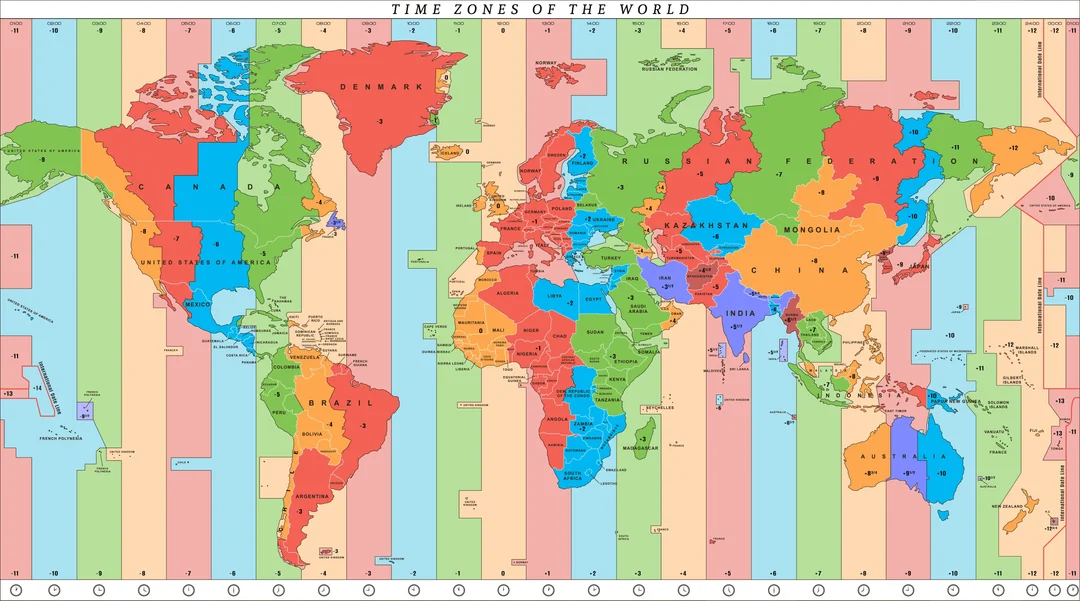
Time zones are a way of mapping the Earth’s 24-hour rotation into practical local times so that noon corresponds roughly to when the sun is highest in the sky. The Earth is divided into longitudinal regions, each offset from Coordinated Universal Time (UTC), which serves as the global reference clock. Historically, timekeeping was local and solar-based until railways and telecommunications forced standardization in the 19th century, leading to the adoption of standardized time zones and eventually UTC as the universal baseline.
In modern computing, time zones are represented using the IANA Time Zone Database (also called the tz or Olson database), which encodes not just fixed offsets (like UTC+1) but also historical changes and daylight saving rules for each region. In Python, the modern standard library tool for working with time zones is zoneinfo (introduced in Python 3.9 via PEP 615), which replaces earlier reliance on third-party packages like pytz.
Naive vs localized timestamps
One of the most important concepts in time zone handling is the difference between naive and aware timestamps. A naive datetime object in Python has no attached time zone information, which means it does not represent an absolute point in time but only a wall clock value.
from datetime import datetime

naive_ts = datetime(2026, 3, 2, 14, 30, 00)
The problem arises when such a timestamp is interpreted differently depending on the system or context. For example, the above example could mean 14:30 in Paris, New York or Tokyo. Without explicit context, Python assumes a timestamp is in the system’s local time zone when converting it. This becomes dangerous since it can produce inconsistent results across machines:
# Assuming the machine's local time zone is Europe/Paris
naive_ts = datetime(2026, 3, 2, 14, 30, 0)
utc_ts = naive_ts.astimezone(ZoneInfo("UTC"))

>>> utc_ts
2026-03-02 13:30:00+00:00
# Assuming the machine's local time zone is America/New_York
naive_ts = datetime(2026, 3, 2, 14, 30, 0)
utc_ts = naive_ts.astimezone(ZoneInfo("UTC"))

>>> utc_ts
2026-03-02 19:30:00+00:00
The correct approach is to always make timestamps timezone-aware before conversion. When naive datetimes represent only a local interpretation of a clock reading, timezone-aware timestamps represent an absolute point in time. Once a timestamp is aware, conversions become reliable and deterministic. In our above example, assuming we meant 14:30 in Paris, making the timestamp timezone-aware will guarantee the same conversion to UTC whether the machine running the code is located in Paris or in New York:
from datetime import datetime
from zoneinfo import ZoneInfo

# Assuming the system's local time zone is America/New_York
paris_ts = datetime(2026, 3, 2, 14, 30, 0, tzinfo=ZoneInfo("Europe/Paris"))
utc_ts = paris_ts.astimezone(ZoneInfo("UTC"))

>>> utc_ts
2026-03-02 13:30:00+00:00
The DST complexity
Daylight Saving Time (DST) adds another layer of complexity to time zone handling because it introduces seasonal shifts in local time offsets. DST is the practice of moving clocks forward in Spring and backward in Autumn to extend evening daylight hours during warmer months.
Not all regions observe DST, and those that do often implement it differently. For example, in the United States, DST typically begins on the second Sunday in March and ends on the first Sunday in November, shifting time zones such as Eastern Time from UTC−5 (EST) to UTC−4 (EDT). In contrast, most European countries, begin DST on the last Sunday in March and end it on the last Sunday in October, shifting from UTC+0 (GMT) to UTC+1 (BST). This mismatch means that for several weeks each year, the time difference between America and Europe changes.
gantt
    title DST 2026 — US vs UK
    dateFormat  YYYY-MM-DD
    axisFormat  %b
    todayMarker off

    section US

    US Winter   :us_w1, 2026-01-01, 2026-03-08
    US Summer   :us_s, 2026-03-08, 2026-11-01
    US Winter   :us_w2, 2026-11-01, 2026-12-31

    section UK

    UK Winter   :uk_w1, 2026-01-01, 2026-03-29
    UK Summer   :uk_s, 2026-03-29, 2026-10-25
    UK Winter   :uk_w2, 2026-10-25, 2026-12-31
Fortunately, zoneinfo handles these transitions automatically using the IANA database, so converting timestamps across zones correctly reflects these offsets without manual adjustment. However, care must still be taken when working with local times around DST transitions, because some local times do not exist (spring forward gaps) or occur twice (fall back ambiguity).